Integrations
Works with the tools you already use
Bring designs, files, blog posts and ideas in from where they already are. Everything arrives as a draft, and nothing goes out without a yes.
No card needed to try. Cancel any time.
- Canva
- Google Drive
- Dropbox
- OneDrive
- Pexels
- Unsplash
- RSS feeds
- Spreadsheet import
- Calendar feed
- Slack
- Zapier
- Make
- n8n
- ChatGPT
- Claude
- MCP
- API
- Signed webhooks
Networks
Eleven networks, through their official APIs
We connect to each network the way it asks apps to connect. No scraping, no browser tricks, no shared passwords.
Instagram
Posts, carousels of up to 10, Reels and Stories; music, collaborators, location, trial Reels and covers; comments and messages.
Facebook Pages
Page posts, several pictures, videos, Reels and Stories; comments and messages.
Threads
Posts with up to 20 pictures or a video; replies in the Inbox.
LinkedIn
Profile and company page posts, up to 20 pictures, videos and PDF documents; comments.
TikTok
Videos and photo posts, with covers.
YouTube
Videos and Shorts, with titles, thumbnails and playlists; comments.
X
Posts and threads with up to 4 pictures or a video, through your own X developer app; mentions.
Pinterest
Pins with a board and a link.
Bluesky
Posts with up to 4 pictures.
Telegram
Channel posts with up to 10 pictures.
Google Business
Updates to your Google Business locations; reviews in the Inbox.







Tools
Fourteen ways in
Every connection, what it does, and the plan it comes with.
- Every plan
Canva
Bring a finished design straight into a post or the Library, each page as its own picture, without downloading it first.
- Every plan
Google Drive
Pick pictures and videos in Google’s own window. Only the files you pick are copied into your Library.
- Every plan
Dropbox
Pick files in Dropbox’s own window, with nothing to connect first. They are copied into your Library.
- Every plan
OneDrive
Sign in with a personal, work or school Microsoft account and pick files in OneDrive’s own window.
- Every plan
Pexels
Search free photos and videos and add them to a post. Each keeps who made it.
- Every plan
Unsplash
Search free photos and add them to a post, with the photographer credited as Unsplash asks.
- Every plan
RSS feeds
Each new post on your blog or site becomes a draft, ready for you to edit and approve.
- Every plan
Spreadsheet import
Bring up to 200 posts in at a time from a CSV file: a title and the words for each, as posts, Reels or Stories.
- Team and up
Calendar feed
Follow the plan in Google Calendar, Outlook or Apple Calendar. Read-only, always up to date.
- Team and up
Slack
A message when it’s someone’s turn to approve, a post waits, someone is mentioned or a post didn’t go out.
- Agency and up
Zapier
Create drafts from the other apps you use: a new product, a form answer, a row in a sheet.
- Agency and up
Make
The same as Zapier, for teams that build their flows in Make.
- Agency and up
n8n
The same again, for teams that host their own automations.
- Agency and up
ChatGPT
Ask ChatGPT to draft posts in your workspace. They arrive as drafts.
- Agency and up
Claude
Ask Claude to draft posts in your workspace. They arrive as drafts.
- Agency and up
MCP
For AI tools that speak the Model Context Protocol.
- Agency and up
API
Create drafts from your own tools, read them back, and see how each one went out.
- Agency and up
Signed webhooks
Hear when a post goes out on a channel, or doesn’t. Each message is signed, so you know it came from us.
Drafts in, never straight out
Connections can write. Only people can say yes.
A zap, a feed or an AI assistant can create a draft. It then waits for the same approval as any other post, so nothing reaches your channels by accident.
Your tool
Zapier, RSS, Claude, the API…
A draft
In your workspace, marked with where it came from
Approval
The same approvers as every post
Scheduled
At its time or the next queue slot
Posted
You hear it went out
Import
A whole content plan in one go
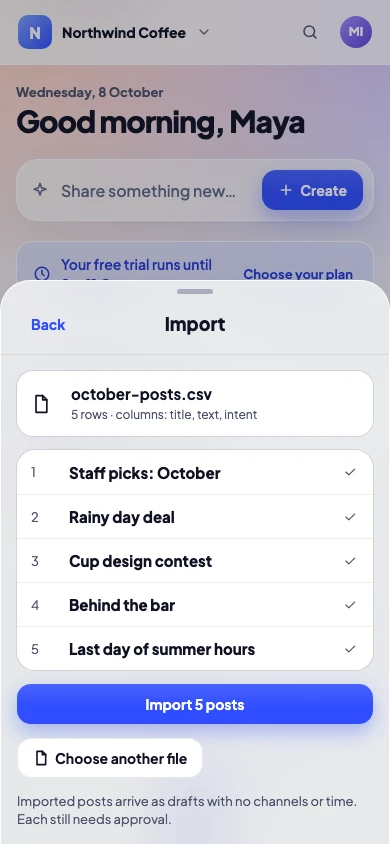
Drop in a spreadsheet with up to 200 posts. Release Social checks each row, shows what it will make, and names any row to fix before anything is created.
- A title and the words for each post, as a post, Reel or Story
- Row-by-row checks, in plain words
- Every imported post starts as a draft
For developers
An API and webhooks for your own tools
On Agency and Enterprise, build on Release Social with API keys you can revoke at any time. A key can create and read drafts, and never approve or post.
- Create drafts, and read them back
- See how each post went out on each channel
- Signed webhooks when a post goes out, or doesn’t
POST https://your-server.example/release-social
content-type: application/json
x-autosocial-signature: sha256=…

{
  "event": "job.published",
  "job_id": "5f0c2e8a-…",
  "draft_id": "a91d07b4-…",
  "draft_title": "Autumn menu launch",
  "status": "published",
  "provider": "instagram",
  "detail": null
}
When a post doesn’t go out on a channel, the event is job.failed and detail says why. The signature is an HMAC-SHA256 of the body with your webhook secret.
Integration questions
Anything else? Write to us, a person answers.
Do integrations cost extra?
No. Each comes with its plan, shown on its card above. There are no add-ons to buy.
Can an integration post without approval?
No. Everything that comes in through an integration is a draft, and waits for the same yes as any other post.
Which networks can I post to?
Instagram, Facebook, Threads, LinkedIn, TikTok, YouTube, X, Pinterest, Bluesky, Telegram and Google Business.
Can I suggest an integration?
Yes, please. Write to us and say what you would like it to do.
Where is the API documentation?
Settings → Integrations says what a key can do when you make one. The full reference comes with the help centre; until then, write to us and we will send it.
Do you support personal Instagram accounts?
No. Instagram lets apps post only to professional accounts, Business or Creator. Switching is free in Instagram’s settings.
Bring your tools. Keep your yes.
No card needed to try. Cancel any time.